Homelab
Table of Contents
A continuously updated list of the hardware and software that makes up my homelab, as well as the services that run on it.
Hardware #
On-site and off-site hardware that makes up my small homelab.
Networking #
My current ISPs are JioFiber and Excitel. I have the following networking hardware:
- TP-Link Archer AX3000 (AX53)
- TP-Link TL-SG108E (Switch)
- TP-Link XZ000-G3 (XPON)
- TP-Link XC220-G3 (XPON Router)
- Raspberry Pi 4B running OpenWRT
I’ve recently added GL iNet Slate AX to my network, which is a travel router that I use for VPN and Tailscale access.
Servers #
- PC running Unraid (i5-12600k, 32GB RAM, 4TB Storage)
- OCI Free Tier x2 (4vCPUs, 24GB RAM, 200GB SSD)
- Raspberry Pi 5 (8GB)
Both OCI and Raspberry Pi 5 are running NixOS.
Future Additions #
Some hardware that I plan to add sooner or later:
See also PC & NAS Build.
Networking #
The network is divided into three parts, the main network, the tailscale network, and the IoT network. The main network is where all the important devices are connected, the tailscale network is for remote access, and the IoT network is for all the smart devices.
OPNsense or pfSense for the main network, but I don’t have the hardware for it yet.VLANs, Subnets and QoS #
I have primarily two IP ranges, i.e., 10.0.0.0/24 and 10.0.1.0/24 for my network. The IoT network is on the same subnet as the main network but is isolated using VLANs.
In addition to this, I have a few QoS rules in place to prioritize traffic set on the AX53, mostly for my MacBook.
OpenWRT is handing out the other range (10.0.1.x) for the tailscale network and is also running a few services like Adguard Home for blocking ads.
VPNs and Tunnels #
I have a Cloudflare Warp wireguard tunnel setup on the Archer AX53, enabled for devices on-demand.
All my devices and servers are connected in a Mesh network using Tailscale. This allows me to access all my devices and servers from anywhere in the world without having to worry about port forwarding or dynamic DNS.

Network Diagram #
I’ve yet to figure out firewall rules and VLANs, but below is a rough diagram of the network.
For wired connections, the Archer AX53 is connected to the switch which is then connected to all the wired devices except the CCTV DVR.
For wireless connections, the Archer AX53 along with OpenWRT provide DHCP and DNS services to all the devices.
(Backup)"} O --> L L -->|Main| D{malware.sh} C --> A L -->|IoT| E{malware.iot} L -->|Tailscale| F{malware.ts} subgraph 10.0.0.0/24 D -.-> G(Smartphones) D -.-> H(Laptops) D -.-> I(Tablets) E -.-> J(Smart Devices) E -.-> K(Air Purifier) end subgraph 10.0.1.0/24 F -.-> M(TV) F -.-> N(On Demand) end
Note that there are two Adguard DNS servers, one is the main one and the other is a backup. The backup is used when the main one is down or unreachable.
I sync both instances using AdguardHome-Sync.
Unraid #
I run Unraid as my primary NAS operating system, handling most of the heavy lifting for my homelab infrastructure. While some services run on OCI instances, the majority of my workload is managed through Unraid.
To extend Unraid’s capabilities, I’ve installed several plugins that enhance my server’s functionality:
- AppData Backup: Automatically backs up application data to remote storage locations
- GPU Statistics: Monitors GPU usage and temperature metrics
- Tailscale: Integrates the server into my Tailscale mesh network for secure remote access
- Unassigned Devices: Enables mounting and management of external drives (SMB, NFS, etc.)
- User Scripts: Facilitates running custom automation scripts on the server
Services #
These are the services that I run on my homelab. Most of them are self-hosted and accessible via Tailscale or Cloudflare1.
Budgeting #
I’m using Actual Budget for managing and tracking expenses. It is a self-hosted budgeting tool that allows me to manage my finances easily.
Media & Books #
For media consumption remotely and locally, these are the services I use:
- Jellyfin (Media Server)
- Prowlarr (Indexer Manager)
- qBittorrent (Torrent Client)
- Radarr (Movie Downloader)
- Sonarr (TV Series Downloader)
I use Calibre and Calibre-Web to manage my ebook library, with Readarr automating downloads. After processing, I send everything to my Kindle PW for reading.
For documents, I’m using Paperless-ngx for easy access.
Source Control #
I use GitHub as my primary source control platform for most projects. Additionally, I maintain a self-hosted Forgejo instance for private repositories and projects that require more control over the hosting environment. Forgejo provides similar functionality to GitHub while allowing me to keep sensitive code completely under my control.
Backups #
I use Immich for seamless photo and video backups of me and my family. For file and system backups, I rely on Restic, all of which are configured to back up securely to Backblaze B2.
I also use Cloudflare R2 for backing up my Actual Budget and Minecraft Server data.
All of these have alerts configured to notify me via Ntfy and Discord.
See also Backing up Minecraft on R2.
Monitoring & Analytics #
I don’t have a full monitoring stack yet, but I use a few key tools to keep an eye on my homelab:
- cAdvisor — monitors containers and resource usage
- Gatus — checks uptime and service health2
- Grafana — main dashboard for metrics and logs
- Plausible — simple analytics3
- Prometheus — collects metrics and handles alerts
For logs, I run Loki with Alloy as the log collector, both connected to Grafana as a datasource.
Every server and machine runs Prometheus with its own scrape configs, and all of them send data to the main Grafana instance. This gives me one place to see metrics, logs, and monitoring across the homelab.
System & Infrastructure #
This is what handles the infrastructure of my homelab, running and exposing the services to the internet.
Tools & Utilities #
Some additional tools and utilities that I use for various purposes.
- Home Assistant (Home Automation - Supervised)
- Linkding (Bookmark Manager)
- Miniflux (RSS Reader)
- Minecraft (Game Server)
- Minecraft Map (Minecraft Map)5
- BentoPDF (PDF Tools)6
- Mealie (Recipe Manager)7
- Copyparty (Portable File Server)
Security & Access Control #
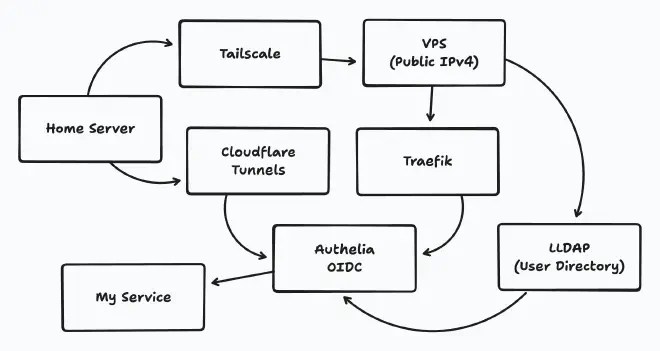
Exposing services to the internet is a risky business, and I have taken a few steps to make sure no malicious actors can access any of my services.
See also Breaking through CGNAT.
Authelia #
I have set up Authelia for two-factor authentication and access control. This adds an extra layer of security to my services.
The main reason for setting up Authelia was to have a single sign-on solution for all my services. This allows me to use my passkeys for all my services and not have to remember multiple passwords.
I also use LDAP for authentication, which is a lightweight directory access protocol that allows me to manage users and groups easily.8
Cloudflare WAF & Access #
I have Cloudflare Access enabled for all my services. This allows me to restrict access to only those who have the right permissions.
Also, a few security rules are set up on Cloudflare to block any malicious traffic. This includes blocking IPs from certain countries, blocking certain user agents, and blocking certain paths.
For example, I have blocked all traffic from China and Russia, as well as any traffic that has a user agent that is not a browser.
You can also check Unraid notes for more details. ↩︎